

Google Associate-Android-Developer Real Exam Questions and Answers FREE
Exam Dumps Associate-Android-Developer Practice Free Latest Google Practice Tests
Testing
- Recognizing the Espresso UI test framework.
- Ability to write local JUnit tests that are useful.
- Knowing how to write useful automated Android tests.
- Understanding the basics of testing in depth.
Who should take the Google Associate Android Developer Certified exam
Individuals should pursue the Associate Android Developer Certified practice exams if they want to demonstrate their expertise and ability to design plan, and prototype in the form of an android application and for those candidates who want to have expertise in the front-end of the android application and the back-end of the android application, or simply any professional who wants in on this specific area of IT of android application development.
NEW QUESTION 58
In general, you should send an AccessibilityEvent whenever the content of your custom view changes. For example, if you are implementing a custom slider bar that allows a user to select a numeric value by pressing the left or right arrows, your custom view should emit an event of type TYPE_VIEW_TEXT_CHANGED whenever the slider value changes. Which one of the following sample codes demonstrates the use of the sendAccessibilityEvent() method to report this event.
- A. override fun onKeyUp(keyCode: Int, event: KeyEvent): Boolean { return when(keyCode) { KeyEvent.KEYCODE_ENTER -> { currentValue-- sendAccessibilityEvent (AccessibilityEvent.TYPE_VIEW_CONTEXT_CLICKED) true
}
...
}
} - B. override fun dispatchPopulateAccessibilityEvent(event: AccessibilityEvent): Boolean { return super.dispatchPopulateAccessibilityEvent(event).let { completed -> if (text?.isNotEmpty() == true) { event.text.add(text) true
} else {
completed
}
}
} - C. override fun onKeyUp(keyCode: Int, event: KeyEvent): Boolean { return when(keyCode) { KeyEvent.KEYCODE_DPAD_LEFT -> { currentValue-- sendAccessibilityEvent(AccessibilityEvent.TYPE_VIEW_TEXT_CHANGED) true
}
...
}
}
Answer: C
NEW QUESTION 59
To build a debug APK, you can open a command line and navigate to the root of your project directory. To initiate a debug build, invoke the assembleDebug task:
gradlew assembleDebug
This creates an APK named [module_name]-debug.apk in [project_name]/[module_name]/build/outputs/apk/ Select correct statements about generated file. (Choose all that apply.)
- A. The file is already signed with the debug key
- B. You can immediately install this file on a device.
- C. The file is already aligned with zipalign
Answer: A,B,C
Explanation:
Reference:
https://developer.android.com/studio/run
NEW QUESTION 60
Content labels. What attribute to use to indicate that a View should act as a content label for another View?
- A. android:labelFor
- B. android:contentDescription
- C. android:hint
Answer: A
Explanation:
Reference:
https://support.google.com/accessibility/android/answer/7158690?hl=en
NEW QUESTION 61
SharedPreferences.Editor is an interface used for modifying values in a SharedPreferences object. All changes you make in an editor are batched, and not copied back to the original SharedPreferences until you call:
- A. commit() or apply()
- B. apply()
- C. commit()
Answer: A
NEW QUESTION 62
What is a correct part of an Implicit Intent for sharing data implementation?
- A. val sendIntent = Intent(this, UploadService::class.java).apply { putExtra(Intent.EXTRA_TEXT, textMessage)
... - B. val sendIntent = Intent().apply { action = Intent.ACTION_SEND
... - C. val sendIntent = Intent().apply { type = Intent.ACTION_SEND;
... - D. val sendIntent = Intent(this, UploadService::class.java).apply { data = Uri.parse(fileUrl)
...
Answer: B
Explanation:
Create the text message with a string
val sendIntent = Intent().apply { action = Intent.ACTION_SEND
putExtra(Intent.EXTRA_TEXT, textMessage) type = "text/plain"
}
Reference:
https://developer.android.com/guide/components/fundamentals
NEW QUESTION 63
To run a debuggable build variant you must use a build variant that includes
- A. minifyEnabled false in the build configuration
- B. debuggable true in the build configuration
- C. debuggable true or debuggable false in the build configuration
Answer: B
NEW QUESTION 64
In general, you should send an AccessibilityEvent whenever the content of your custom view changes. For example, if you are implementing a custom slider bar that allows a user to select a numeric value by pressing the left or right arrows, your custom view should emit an event of type TYPE_VIEW_TEXT_CHANGED whenever the slider value changes. Which one of the following sample codes demonstrates the use of the sendAccessibilityEvent() method to report this event.
- A. @Override
public boolean onKeyUp (int keyCode, KeyEvent event) {
if (keyCode == KeyEvent.KEYCODE_ENTER) {
currentValue--;
sendAccessibilityEvent(AccessibilityEvent.TYPE_VIEW_CONTEXT_CLICKED);
return true;
}
...
} - B. @Override
public boolean dispatchPopulateAccessibilityEvent(AccessibilityEvent event) { boolean completed = super.dispatchPopulateAccessibilityEvent(event); CharSequence text = getText(); if (!TextUtils.isEmpty(text)) { event.getText().add(text); return true;
}
return completed;
} - C. @Override
public boolean onKeyUp (int keyCode, KeyEvent event) {
if (keyCode == KeyEvent.KEYCODE_DPAD_LEFT) {
currentValue--;
sendAccessibilityEvent(AccessibilityEvent.TYPE_VIEW_TEXT_CHANGED);
return true;
}
...
}
Answer: C
Explanation:
Reference:
https://developer.android.com/guide/topics/ui/accessibility/custom-views
NEW QUESTION 65
In a class PreferenceFragmentCompat. What method is called during onCreate(Bundle) to supply the preferences for this fragment. And where subclasses are expected to call setPreferenceScreen (PreferenceScreen) either directly or via helper methods such as addPreferencesFromResource (int)?
- A. onCreateView
- B. onCreateLayoutManager
- C. onCreateRecyclerView
- D. onCreatePreferences
Answer: D
NEW QUESTION 66
Move the major components of the Android platform to correct places in diagram.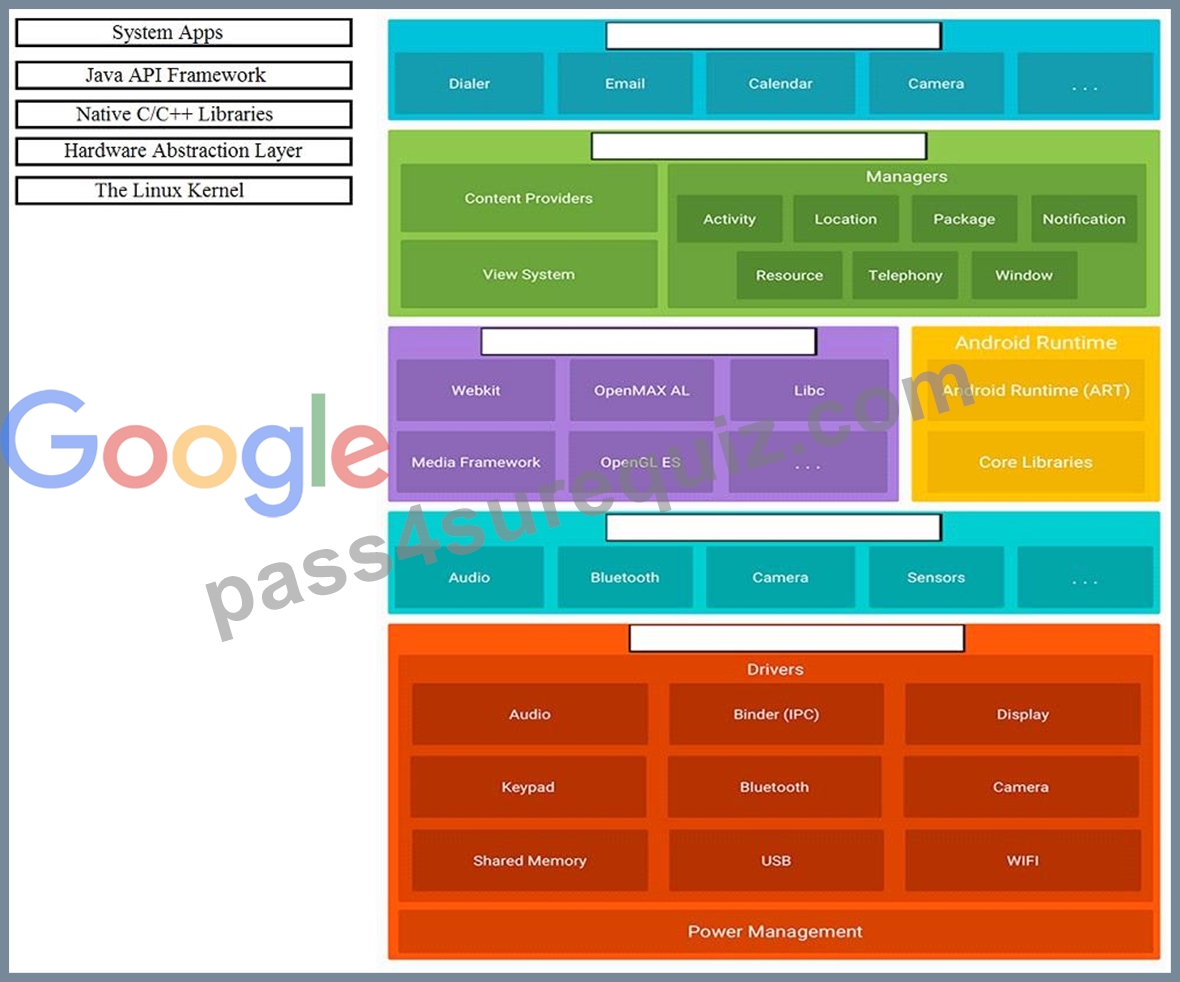
Answer:
Explanation:
Reference:
https://developer.android.com/guide/platform
NEW QUESTION 67
When using an ImageView, ImageButton, CheckBox, or other View that conveys information graphically. What attribute to use to provide a content label for that View?
- A. android:labelFor
Explanation - B. android:hint
- C. android:contentDescription
Answer: C
Explanation:
Reference:
https://support.google.com/accessibility/android/answer/7158690?hl=en
NEW QUESTION 68
With a room database. When performing queries, you'll often want your app's UI to update automatically when the data changes. Can you use a return value of type LiveData in your query method description to achieve this?
- A. No
- B. Yes
Answer: B
Explanation:
Room generates all necessary code to update the LiveData when the database is updated.
NEW QUESTION 69
Once your test has obtained a UiObject object, you can call the methods in the UiObject class to perform user interactions on the UI component represented by that object. You can specify such actions as: (Choose four.)
- A. moveTo() : Move this object to arbitrary coordinates.
- B. touch() : Touch the center of the visible bounds of the UI element.
- C. swipeUp() : Performs the swipe up action on the UiObject. Similarly, the swipeDown(), swipeLeft(), and swipeRight() methods perform corresponding actions.
- D. dragTo() : Drags this object to arbitrary coordinates.
- E. setText() : Sets the text in an editable field, after clearing the field's content. Conversely, the clearTextField() method clears the existing text in an editable field.
- F. click() : Clicks the center of the visible bounds of the UI element.
Answer: C,D,E,F
NEW QUESTION 70
Building your app from the command line, if you have a "demo" product flavor, then you can build the debug version with the command:
- A. gradlew installDemoDebug
- B. both variants are correct.
- C. gradlew assembleDemoDebug
Answer: B
Explanation:
Before immediately install build on a running emulator or connected device, installDemoDebug cause an APK building.
Reference:
https://developer.android.com/studio/run
NEW QUESTION 71
If no any folder like res/anim-<qualifiers>, res/drawable-<qualifiers>, res/layout-<qualifiers>, res/raw-
<qualifiers>, res/xml-<qualifiers> exist in the project. Which folders are required in the project anyway? (Choose two.)
- A. res/xml/
- B. res/anim/
- C. res/raw/
- D. res/drawable/
- E. res/layout/
Answer: D,E
Explanation:
Reference:
https://developer.android.com/guide/topics/resources/localization
NEW QUESTION 72
SharedPreferences.Editor is an interface used for modifying values in a SharedPreferences object. To mark in the editor that a preference value should be removed, which will be done in the actual preferences once commit() or apply() is called, what method in SharedPreferences.Editor should we use?
- A. delete(String key)
- B. remove(String key)
- C. removeAll()
- D. clear()
Answer: D
Explanation:
clear() method marks in the editor to remove ALL values from the preferences. Once commit is called, the only remaining preferences will be any that you have defined in this editor.
And no delete and removeAll method exists in SharedPreferences.Editor
NEW QUESTION 73
If constant LENGTH_INDEFINITE is used as a parameter for the setDuration method in Snackbar, what will happen?
- A. The Snackbar will be displayed for a long period of time.
- B. The constant LENGTH_INDEFINITE is impossible parameter for the setDuration method in Snackbar
- C. The Snackbar will be displayed for a very long period of time.
- D. The Snackbar will be displayed for a short period of time.
- E. The Snackbar will be displayed from the time that is shown until either it is dismissed, or another Snackbar is shown.
Answer: E
NEW QUESTION 74
......
In addition, the students should also develop competence in the content of the study guide. Below are the highlights of its topics:
Android Core: This section requires that the individuals have an understanding of Android system’s architecture and be able to explain the fundamental building blocks of the Android app. They also need to possess a good comprehension of the process required to develop, build, and run an Android application as well as be capable of displaying basic messages in a pop-up with the use of a ‘Toast’ or a ‘Snackbar’. The test takers should possess the skills in displaying messages outside the UI of an app with the use of ‘Notification’ and schedule background tasks with the use of ‘WorkManager’. Additionally, they should understand the process of localizing an app.
User Interface: This part requires that the applicants have an understanding of the activity lifecycle of Android. They should also be capable of creating an ‘Activity’ that shows a ‘Layout’ as well as constructing a UI using ‘ConstraintLayout’. The section also requires an understanding of how to build a custom ‘View’ class and include it to a ‘Layout’; familiarity with the process of implementing custom app themes and including accessibility hooks to the custom ‘View’. Additionally, the students should also understand how to apply the content descriptions to a view for accessibility. It is also important to understand the process of displaying items in a ‘RecyclerView’ and have the capacity to bind local data to the ‘RecyclerView’ list with the use of the Paging library. They should be able to implement both menu-based and drawer navigation.
Data Management: This topic measures the learners’ skills in defining data with the use of Room entities; accessing ‘Room’ database using a data access object; observing and responding to changing data with the use of ‘LiveData’. The applicants should also have competence in reading and parsing asset files or raw resources; using a Repository for mediating data operations; creating persistent Preference data from the user input; changing behaviors of an app based on the user preferences.
Debugging: This domain will evaluate your understanding of the fundamental debugging methods that are available within Android Studio. It will also measure the skills required for debugging and fixing issues associated with the usability and functional behavior of an app as well as the skills in using System Log to output the debug information. This section of the exam also requires an understanding of the process involved in using breakpoints in Android Studio and inspecting variables with the use of Android Studio.
Testing: This area requires a thorough understanding of the fundamentals of testing and the ability to write the functional local JUnit tests. It will also measure the understanding of the Espresso UI test framework as well as the skills in writing the functional automated Android tests.
Verified Associate-Android-Developer Exam Dumps Q&As - Provide Associate-Android-Developer with Correct Answers: https://www.pass4surequiz.com/Associate-Android-Developer-exam-quiz.html